The console
A local web page that shows what your team is doing, what the kit has learned, and what changed.
The console runs on your own computer. It starts by itself when you open a session in a project, at http://127.0.0.1:8765/. Nothing in it is sent anywhere. Seven pages share one menu at the top.
Open it as that web address, not as a file from your disk, and reload the page after a kit update.
Console
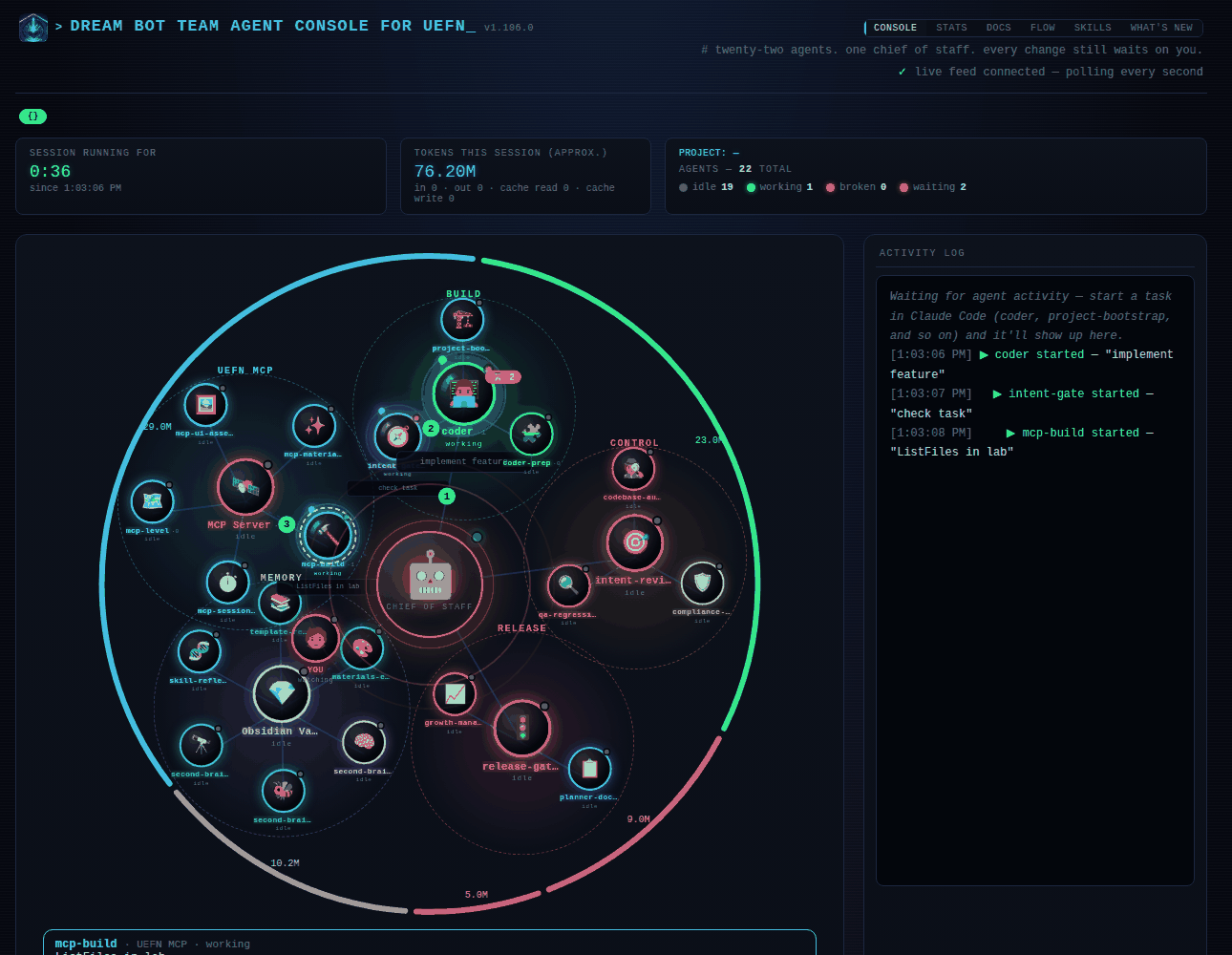
The live view, drawn like a small solar system. The chief of staff, which is your main Claude session, is the sun. Five planets orbit it, one per group: BUILD (coder), CONTROL (intent-reviewer), RELEASE (release-gate), MEMORY (the Obsidian Vault) and UEFN MCP (the MCP server). The other agents are the moons of their planet: they turn around it in the opposite direction and more slowly. An agent lights up while it works, and a pulse travels from one to another on a hand-off. You are the small red card near the sun.
- Session running for and tokens this session at the top. The token count is an approximation, summed from the session transcript.
- The five-stage rail follows the current task from intent-gate to planner-docs.
- The activity log on the right lists what each agent started and finished.
- A coloured arc around the whole system, one per group, as long as the tokens that group used (last 30 days). The numbers on the arcs are those tokens.
- A small light on each card: grey when idle, green while working, yellow while waiting for a helper, red when it has run suspiciously long.
Below the cards, Tokens per agent (last 30 days) opens a table with, for each agent, how many times it ran and how many tokens it used (input, output, cache read, cache write, total) and on which model. It is read from the transcripts Claude Code keeps for each helper, so it shows only what exists on this computer: if nothing is found, it says "not available" instead of zero. It counts tokens, not money, because prices change, and it leaves out your main session, which the box above already shows. The first opening can take a few seconds while older runs are read.
Under the map there is a row of six round switches. Each one shows or hides one thing, and the choice is remembered in this browser:
- Token: the coloured arcs around the system.
- Queue: a red
⏳ nlabel on a group when some of its agents are waiting for a helper. - Chain: numbers 1, 2, 3 on the lines of the agents that are working, in the order they started.
- Detail: click any card to see what it is doing, how often it ran this session and its tokens, in a card under the map.
- Pins: press Pin in that card and the agent stays in a row of small cards under the map.
- Needs you: a red line under the map when an agent is waiting for your approval.
The long explanation of every animation is folded under How to read this page.
Why it is there. To answer one question without reading a log: is my team working, on what, and is something stuck? The ring shows who is busy, the rail shows how far the task has come, and the red light warns about an agent that has been running for suspiciously long.
Stats
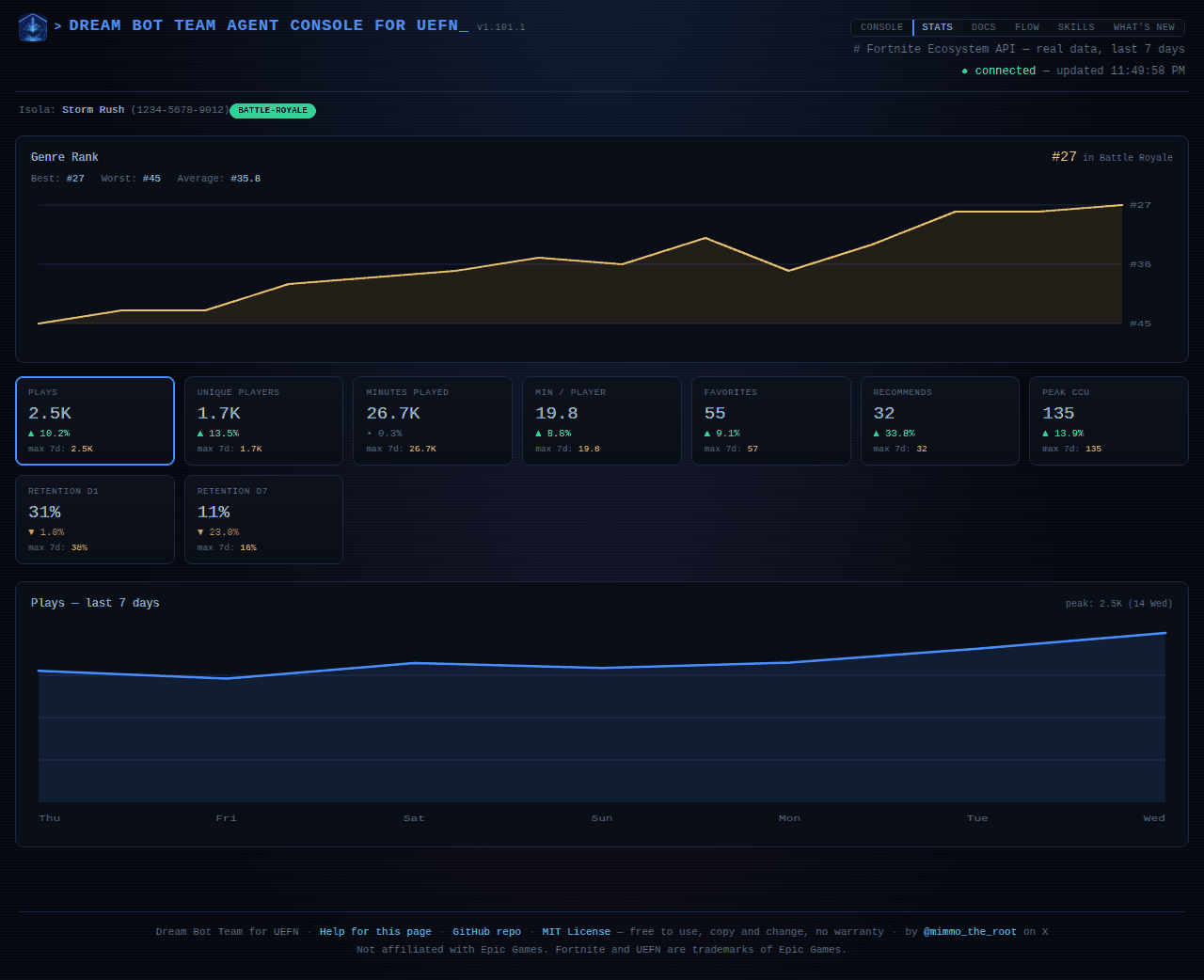
Real numbers from Epic's public data about your island: plays, unique players, minutes played, minutes per player, favorites, recommends, peak players and day-1 and day-7 retention, over the last 7 days. Click a tile to see its chart.
Epic usually shows numbers only after the map is published and has had visitors, so a new map shows one message instead of empty tiles. The page needs the island code saved in the project.
Why it is there. Epic's numbers tell you whether people come, stay and come back. Day-1 and day-7 retention are the ones to watch: they show whether the first minutes work and whether the map is worth returning to. The analytics coach works from the same numbers when it proposes changes.
Docs
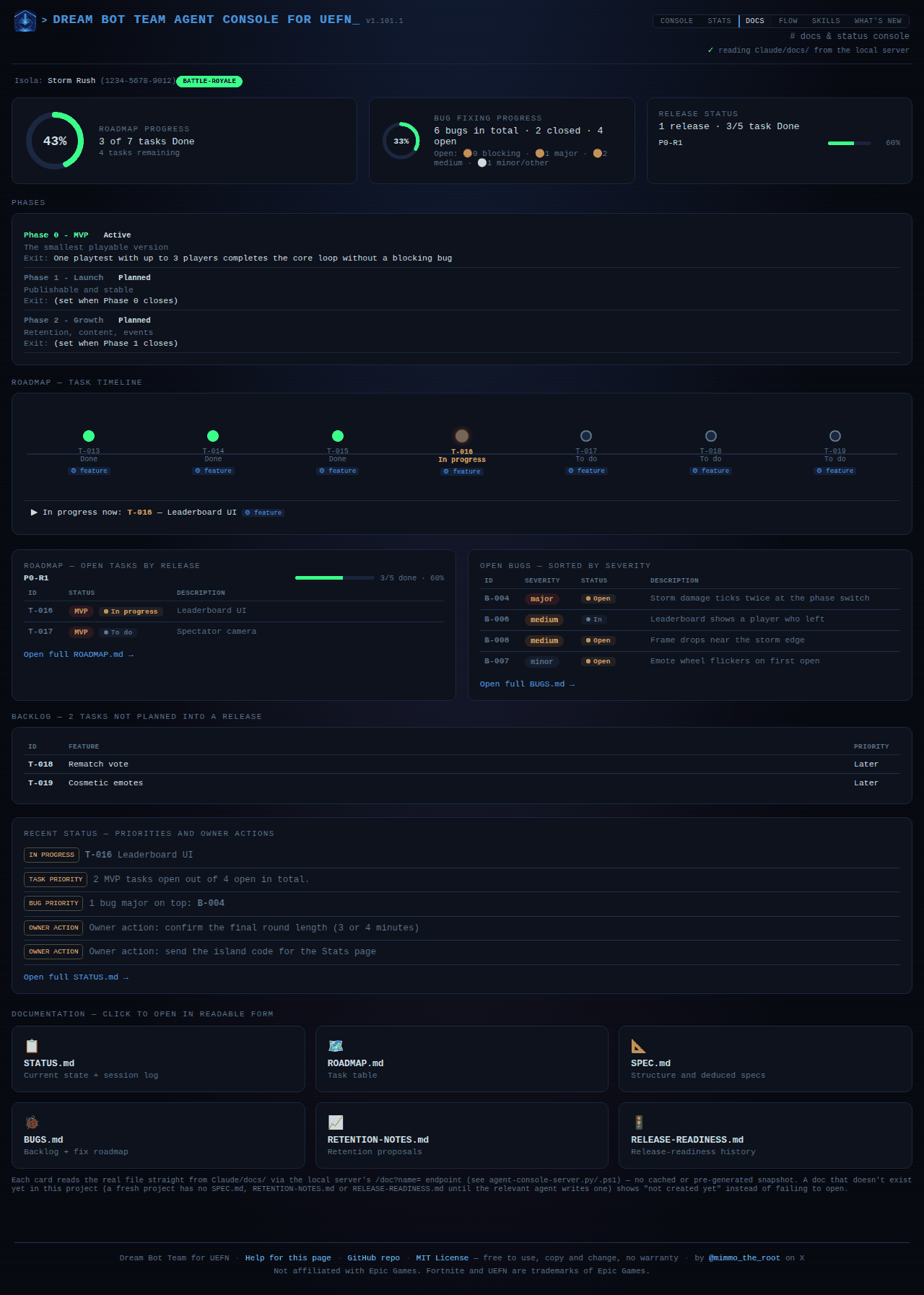
The project's own documents, read from Claude/docs/: spec, status, roadmap, bugs and release readiness. It is a read-only view of what the agents keep up to date.
What you see
- Three progress bars at the top: Roadmap progress, Bug fixing progress and Release status.
- Roadmap, open tasks by release: what is still to do, grouped by the release it belongs to.
- Open bugs, sorted by severity: the worst first, with status.
- Recent status: the priorities and the actions that wait for you, taken from
STATUS.md. - Documentation: one card per document (
STATUS,ROADMAP,SPEC,BUGS,RETENTION-NOTES,RELEASE-READINESS). Click one to read it, rendered or as raw text. A document that does not exist yet says "not created yet" instead of failing to open. - Live, who is working now: the agents active at this moment.
The page follows the files: when an agent saves a document, the page redraws within about five seconds, so you can keep the tab open.
Why it is there. So you can see where the project stands without opening files, and check what the agents wrote. planner-docs is the only one that edits the roadmap and the status; you read, and approve what asks for your decision.
Flow
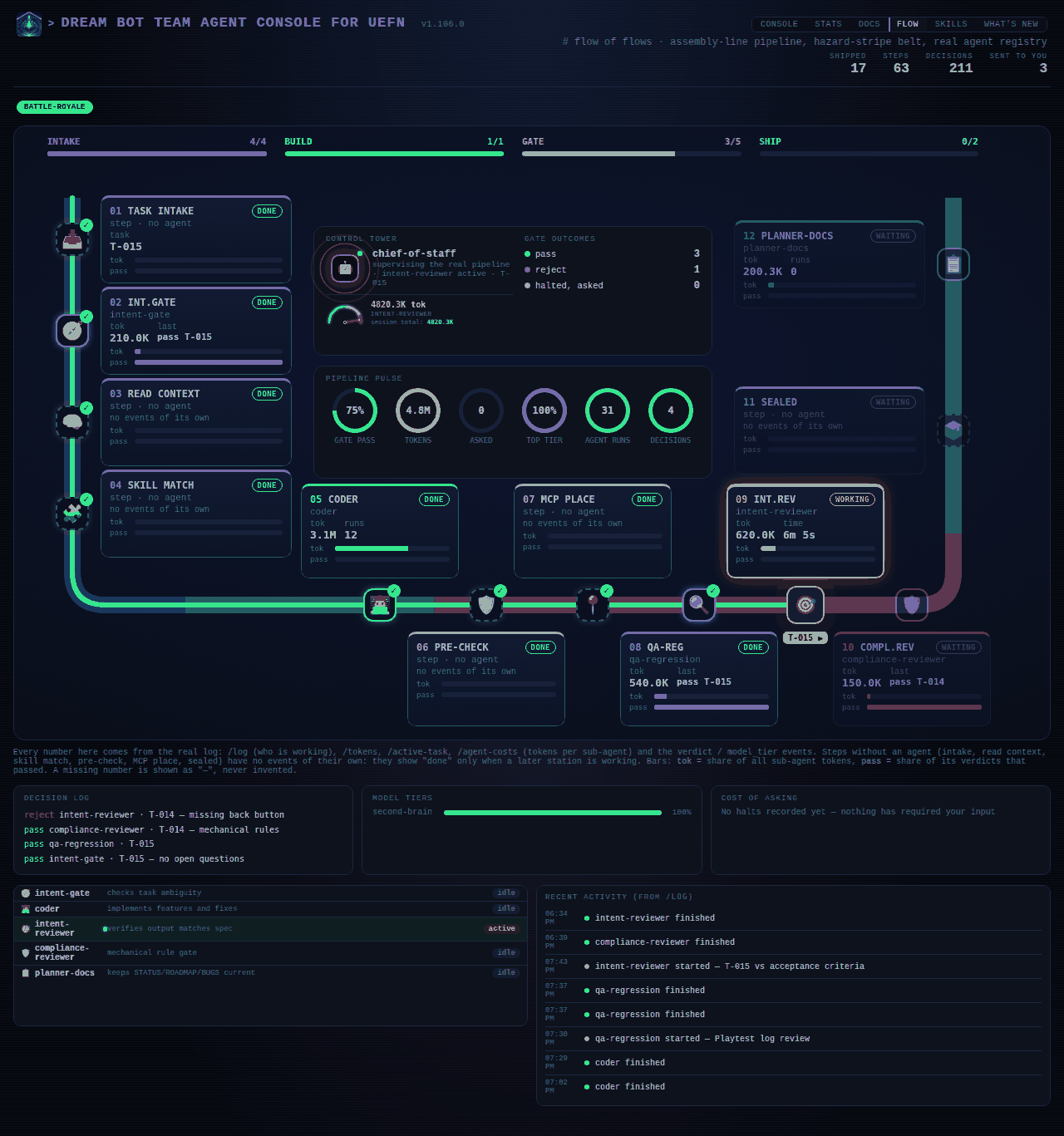
The pipeline as a U-shaped board: every station a task passes through, in order. Intake runs down the left side, build and gate along the bottom, ship up the right side.
What you see
- Twelve stations, each with a card: its number, its name, its state (done, working, waiting or idle), the agent that runs it, two figures and two bars. The agent's own icon sits on the track at its station, so you see who is where. The station that is working carries a tag with the task ID.
- The two figures are the agent's tokens and, while it works, how long it has been at it; when it is not working, its last verdict. The bars show the agent's share of all sub-agent tokens (tok) and the share of its verdicts that passed (pass).
- Four bars at the top, one per zone (intake, build, gate, ship), fill as stations are done.
- In the middle, the Control Tower (the chief of staff and the token gauge, the same count as the Console page) with the gate outcomes (pass, reject, halted and asked you), and under it the Pipeline pulse: six rings for gate pass rate, session tokens, times the team asked you, the model tier used most, agent runs and decisions.
- Below the board: the decision log, the model tiers, the cost of asking you, the agent list and the recent activity.
Some steps (task intake, read context, skill match, pre-check, MCP place, sealed) are not agents and write no events. They show "done" only when a later station is working, and they carry no numbers. A figure the kit cannot read is shown as a dash, never invented.
Why it is there. To see where a task is, what it costs and why it waits. If the tokens pile up at one station, that is where the cost is. A reject at a gate explains why a task goes back to the coder. The "asked you" ring counts how often the team had to stop and wait for you, which is the number to bring down.
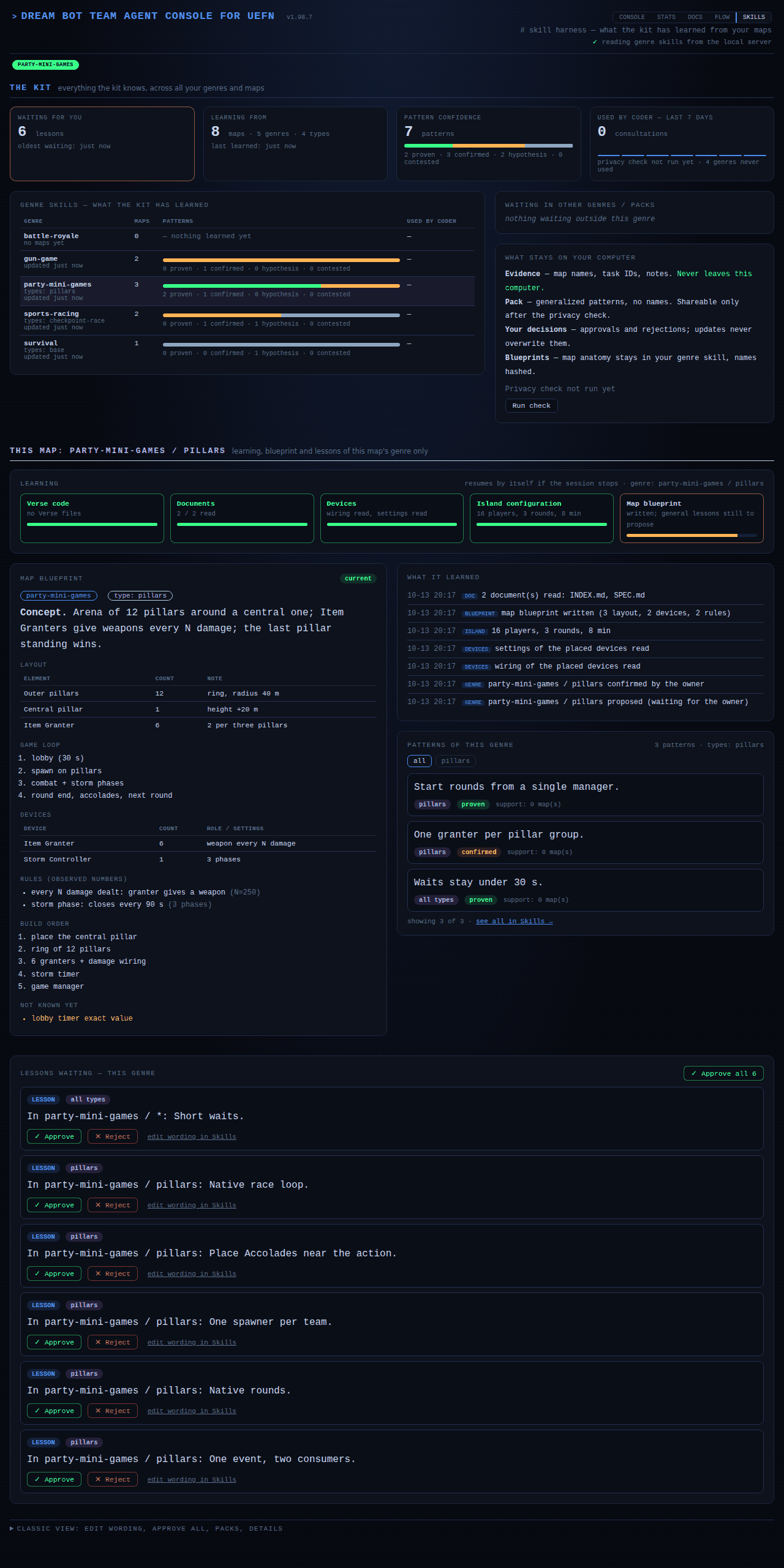
Skills
What the kit has learned, in four parts:
- The kit: everything it knows across all your genres and maps.
- This map: the genre and type of the map you are in, its blueprint, and the lessons waiting for your approval.
- UEFN MCP: how many of UEFN's tools have a recipe ("recipes cover 225 of 388 tools, 221 proven") and how many answered in tests, what the safe tests found, and the latest news: tools added, removed or no longer working. The card also shows the progress of the recipes: four rings (proven by use, tool answered, not verified, failed), a bar per area and the growth over the last weeks. It fills by itself, see The MCP engine.
- Community: the switch to share lessons, covered in Community.
The SKILLS tab blinks when something waits for you. More in Skills and lessons.
Why it is there. The kit learns from your maps, and you decide what it keeps. This page is where you approve or reject a lesson, see how much of UEFN's toolset the kit really uses, and choose whether to share anything with the community.
What's new
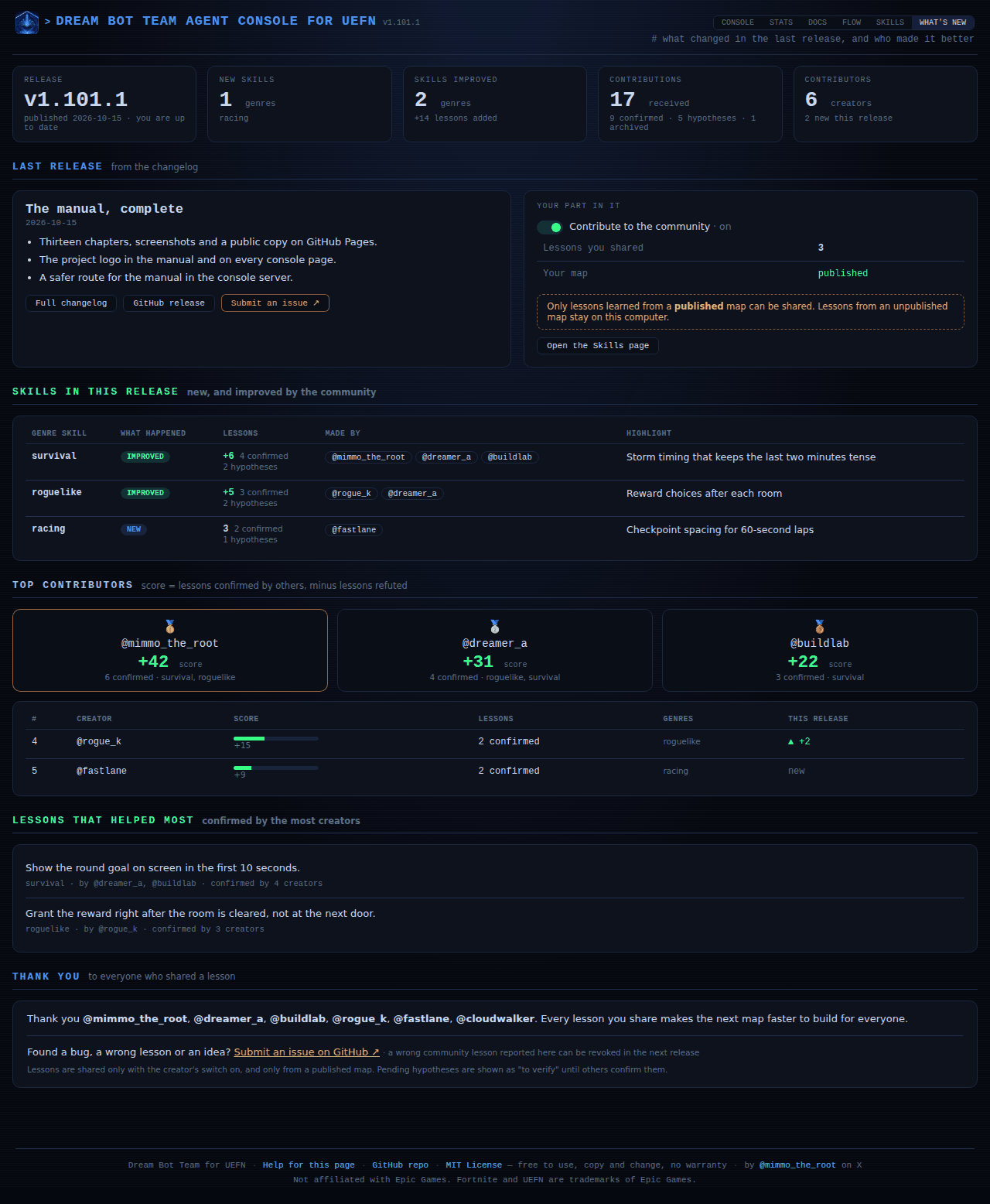
The last release in plain words, the skills that improved, the top contributors, the thanks, and a link to submit an issue on GitHub. It also shows your own part: whether sharing is on, how many lessons you shared, and whether your map is published.
Why it is there. After an update, to know what changed and whether it concerns you, and to see the community's part in it.
Score
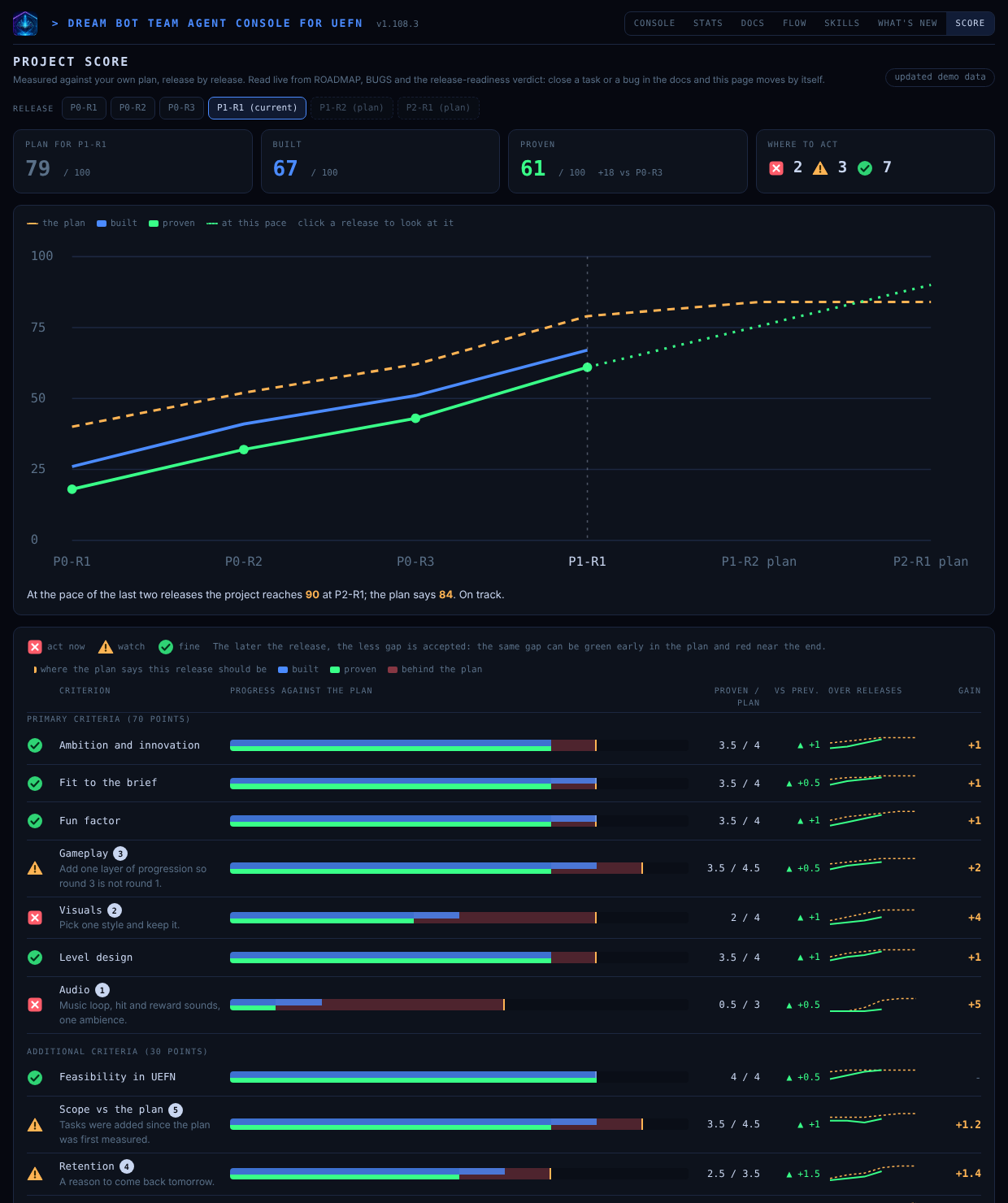
How far the project is against its own plan, release by release. A chart shows the plan, what is built and what is proven, with a forecast at the current pace. Under it, every criterion has a traffic light (red act now, yellow watch, green fine) and a number saying where to work first. The primary criteria are the quality criteria of the contest or genre (70 points); the additional ones are ours (feasibility, scope, retention, publishing readiness, documentation; 30 points); a bonus track is shown but not counted.
Nothing is typed by hand. The page reads ROADMAP, BUGS and the release-readiness verdict of the project, so closing a task or a bug in the docs moves the score by itself. Tasks the page cannot link to a criterion are listed, and the team classifies them. New criteria are proposed on the Skills page and need your approval.
Why it is there. To see at a glance what is missing in an advanced project, and to compare one release with the previous one.
Update banner
When your computer holds a newer kit version than the project you are in, the console says so. Run /kit-update, open a new session, and reload the page.