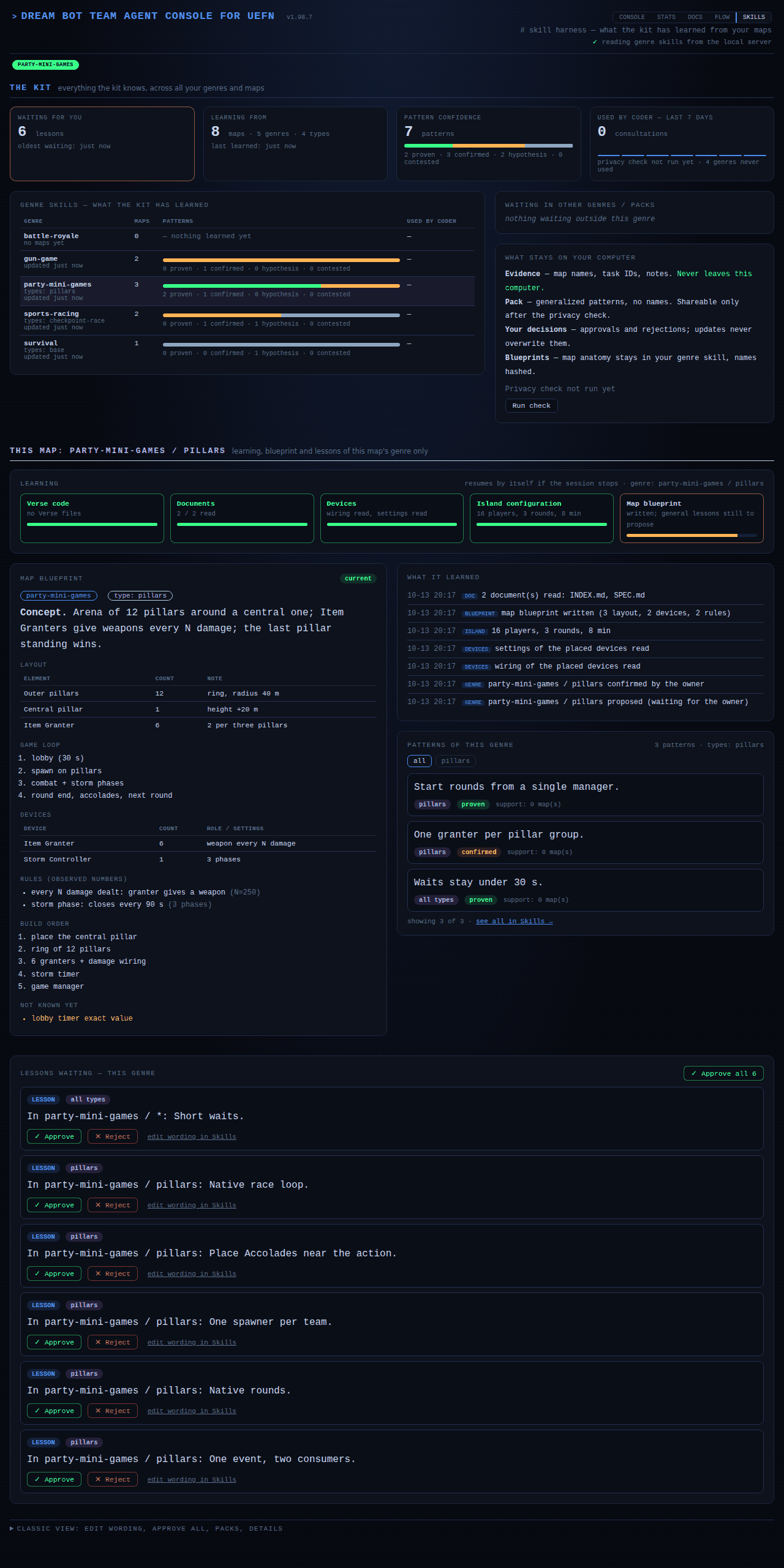
Skills and lessons
Every map you work on teaches the kit something. You approve what it keeps.
A genre skill is the kit's memory about one kind of game: survival, party games, roguelike and so on, using Epic's own Discover genres. It holds patterns that worked, and the coder reads them before writing code. Skills used to stay empty until you wrote lessons by hand. Now they fill from your real maps.
What it reads
At the first message of a session, before answering it, the kit reads three things, and only what changed since last time:
- Your Verse code, through a map of the project built by a script with no AI cost.
- Your project documents, compared with the code. Where they disagree, the kit corrects the document, with a backup, never silently.
- The devices placed in the level, their wiring and settings, and the island configuration, through the UEFN connection. This needs UEFN open; otherwise it waits for next time.
It never interviews you about your map. If a session stops halfway, the next one continues where it stopped. You can force it with /learn-map, and rebuild only the Verse map with /verse-map.
Checking that the code builds
/verse-check asks your open UEFN to build the whole Verse project, the same build as "Build Verse Code" in Visual Studio Code, and answers with one of three states: clean (built, no errors), errors (with the build log: file, line, message) or not analyzed (UEFN is not reachable, so nothing was checked). The coder runs it before calling a task Done and the release gate runs it before a verdict; "not analyzed" is never reported as "compiles". It changes nothing in your project.
When a build ends with errors, the kit notes it in Claude/logs/verse-errors.jsonl (time, error codes, a short excerpt without file paths). If the same error shows up in two different builds, the coder tells you in one line what it was and what fixed it, and asks whether to add it to the Verse lessons. It writes the lesson only after you say yes. Changes to Verse files are logged the same way in Claude/logs/verse-changes.jsonl (file, time, summary, reason, outcome) instead of in the file header; python Claude/hooks/verse_changes.py list shows the latest ones.
Building screens with Epic's Verse UI Kit
Epic's Verse UI Kit is a free Fab download with ready-made widgets (buttons, switches, sliders, tabs, toasts, dialogs, menus) and the Verse code that drives them. It comes in two parts: the kit itself, which goes into every project that uses it, and a separate download on the same Fab page, an AGENTS.md guide for AI assistants. The guide is kept once on your computer for all projects, in .claude\skills\verse-ui-kit\references\epic\ inside your user folder, so you do not copy it into each project (py -3 Claude/hooks/ui_kit_check.py --store <the downloaded file> puts it there).
/ui-kit-check tells you where you stand, in one line: ok, package missing (the kit is optional; the coder builds the screen without it and mentions that the free kit can save time), guide missing (download the AGENTS.md from the Fab page and store it once) or guide changed (Epic updated it). The coder runs it before any UI work and follows the verse-ui-kit skill, which holds the rules for focus, gamepad, Back and click wiring, plus short code snippets.
The kit never contains Epic's guide: the Fab licence does not allow handing it on, so only a fingerprint of the version it was written against is kept. When Epic changes the guide, the kit tells you and offers to analyze what changed; nothing in the skill changes until you say yes. The snippets are marked "not compiled" until /verse-check has built them in a project with the kit.
/mcp-snapshot maps every tool UEFN's MCP server offers and, on later runs, shows what is new. It needs UEFN open. See The MCP engine.
Checking publication texts
/text-scan looks through the texts you are about to publish (island title, description, tags, update notes, social posts) for emoji, fake-bold letters, arrows and box symbols, and invisible characters such as zero-width spaces. It reads the folder Claude/docs/publish/ by default, or the files you name. The title and description skill and the update writer save their texts there and run it. It works offline, only reports, and never edits your text. Normal accents, curly quotes and dashes are fine.
You confirm the genre and the map type
The kit only proposes the genre and the map type (a free name such as pillars, red-vs-blue or checkpoint-race). Until you confirm them on the Skills page, nothing is written to your skills. Confirming saves the waiting blueprint and lessons by itself.
A map that is the same base game dressed for another franchise is a type of the same genre. The kit reads the franchise from your documents; the shared base is type base.
The blueprint
What it learned becomes a blueprint inside the genre skill: the layout with counts, the game loop, the devices and how they are wired, the rules with the numbers observed, and the build order. It is marked out of date when code, documents or devices change, and rewritten at the next opportunity. What it could not read stays marked unknown and is retried, never invented.
Lessons and how much to trust them
Each analysed map also queues three to five general lessons. You approve, edit or reject them on the Skills page, or use Approve all. A lesson earns trust as more of your maps back it:
| Level | Meaning |
|---|---|
| Hypothesis | One map. Only a suggestion; the coder is told it is unproven. |
| Confirmed | Two maps. |
| Proven | Three or more maps, or two plus a retention metric. A rule to follow. |
| Reference | Comes from an official source. |
| Contested | Something contradicts it. |
What stays on your computer
Your map names, task ids, notes and evidence stay in a private layer called local/ and never leave. Only generalized patterns can be shared, after a privacy check, and only if you choose. See Community.
Where to find it
On the Skills page of the console. The SKILLS tab of every console page blinks while a lesson, a pack update or a genre confirmation waits for you.